Every worktree and agent,
at a glance.
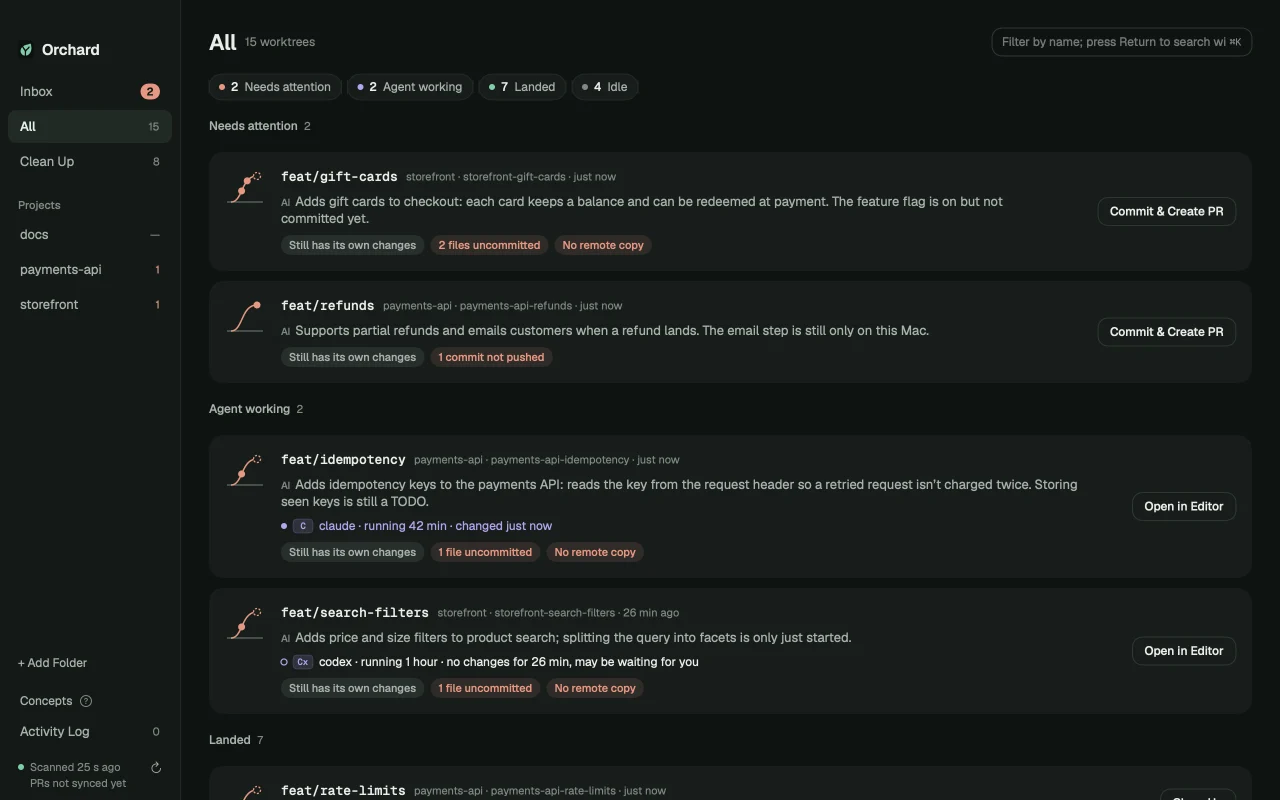
Orchard puts every git worktree on your Mac in one view: which agent is still working, what’s waiting for you, and what’s already in main and can be cleared out. AI explains what each one is.
Worktrees pile up.
Nobody remembers which ones still matter.
Three agents, three worktrees, and your main checkout on yet another branch. A week later some PRs were squash-merged, some changes are still sitting on disk, and some commits were never pushed. Which ones are done? Which agent is waiting on you? git can’t say.
git tells you where they are
12 worktreesOrchard tells you what to do
same worktreesWho’s still working.
Who’s waiting on you.
Orchard spots Claude Code, Codex, Gemini CLI and other agents by the folder they’re running in, so every worktree shows who’s on it. Nothing to install or configure.
- Live status. Which agent, how long it’s been running, and when it last changed a file.
- Spot the stalled one. No changes for a while? Orchard flags that it may be waiting for you.
- Right in the menu bar. Running agents and unlanded work, without opening the window.
- Never in its way. Background checks are read-only, so Orchard never fights an agent for
index.lock, and a worktree with an agent in it is left alone.
AI explains the work.
It doesn’t decide.
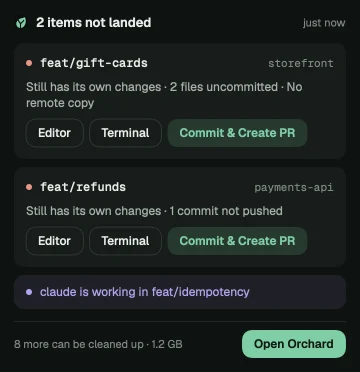
Sign in with ChatGPT and Orchard tells you what each worktree is, how far it got and what to watch out for before you merge. It also drafts commits and PR text, and lets ⌘K find work by description.
- Explains, never decides. Whether work is already in main is computed by the deterministic check. AI only puts it into words.
- Runs on your ChatGPT plan. No API key to set up, and Orchard adds no charge. Signed out, no code leaves your Mac and every core feature still works.
- Your own key, your choice of provider — planned. Sign in with ChatGPT is the first option. Using your own API key with other AI providers is on the roadmap.
What hasn’t landed
stays in front of you.
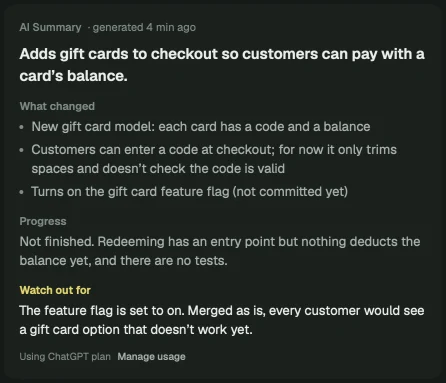
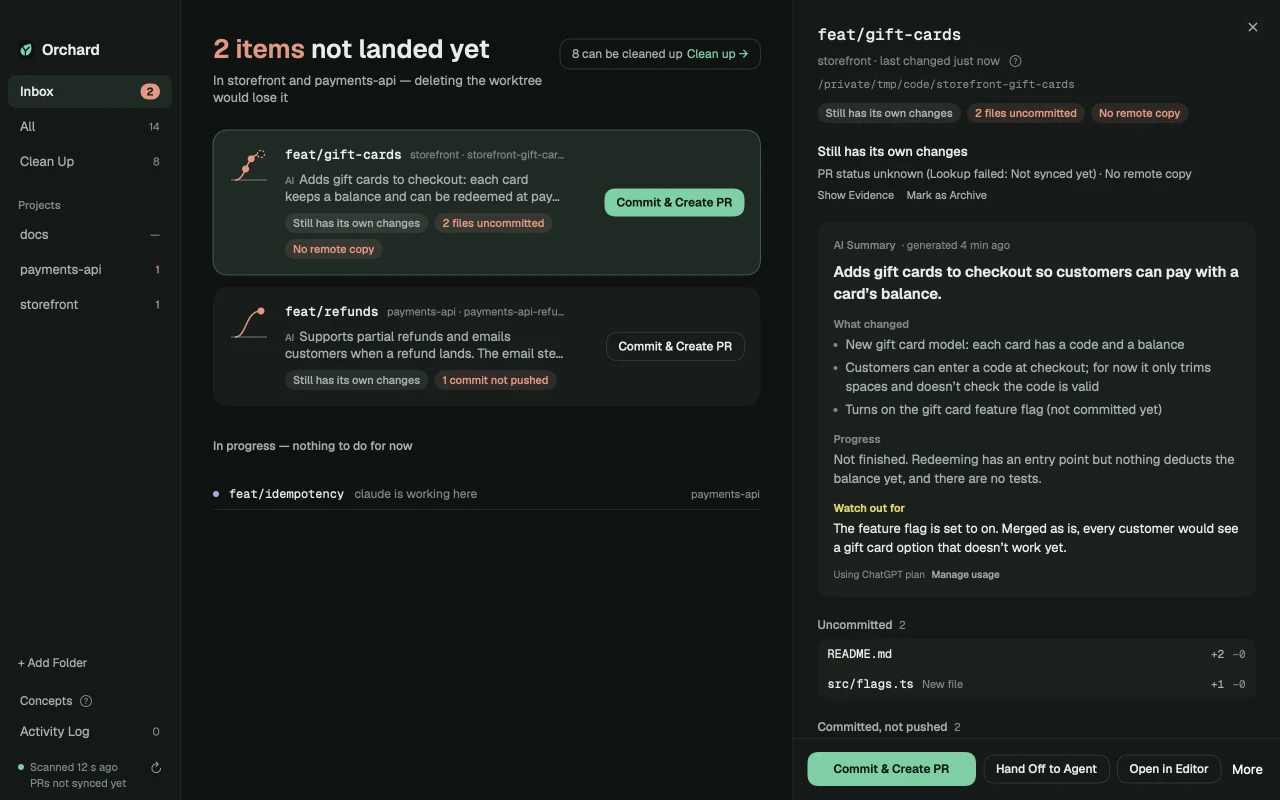
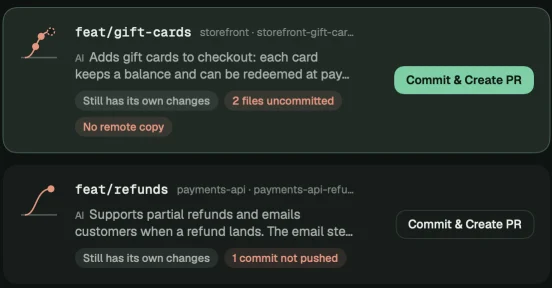
The Inbox lists only worktrees that would lose work if deleted. Each card names the concrete reason and puts the next step on the right: commit and open a PR, save orphaned commits to a branch, or hand it back to an agent.
Uncommitted changes
Including new files git isn’t tracking yet. Most half-finished agent work lives here.
Committed, not pushed
Only on this Mac. Commits already in main don’t count, so no false alarms.
Branches never pushed
Created locally, never on the remote — the easiest thing to lose with a worktree.
Stashes
Grouped under the worktree they belong to, instead of an anonymous stash@{3}.
Commits on a detached HEAD
Not on any branch; switch away and they’re gone. Save them to a branch in one click.
Interrupted operations
A rebase, merge or cherry-pick stopped halfway. Until it’s finished or aborted, the worktree can’t be cleaned up.
Clear out what’s done.
Each with its reason.
git branch --merged misses squash and rebase merges, so finished worktrees pile up looking unfinished. Orchard picks out the ones already in main, says why for each, and clears them in one go.
- A reason for every one. “PR #142 merged 3 days ago”, “Merged into main as a whole (squash)” — never a bare “done”.
- Forgotten ones too. Worktrees nobody has touched in weeks show up with how long they’ve sat, and every row shows the space it takes.
- Just want the space? Clean only build artifacts like
node_modulesand keep the worktree. - Changed your mind? Anything you clean up can be restored for 7 days.
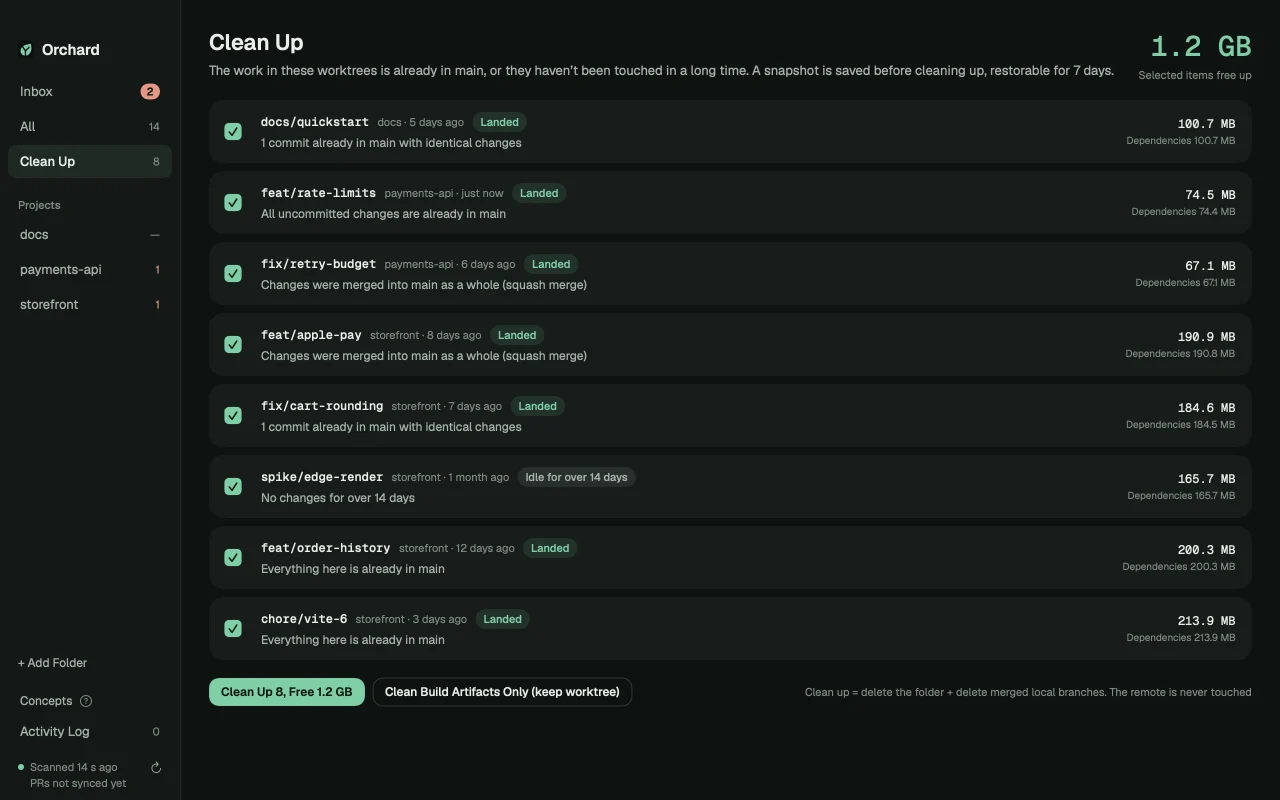
CommitsThe branch tip is already an ancestor of main. Catches plain merges and fast-forwards.
PatchesCompares each commit’s patch and the branch’s overall change to catch rebases, cherry-picks and squashes — then cross-checks PR status on GitHub.
ContentEven uncommitted changes are compared piece by piece: identical content is already in main, or it’s an older version that a later commit replaced.
One line
tells the story.
Every card has a branch rail: the grey line is main, the curve is this worktree’s branch. One glance shows where the risk is; hover for a plain-English explanation.
Quiet by design.
Agents keep working.
Orchard watches and tidies up. It doesn’t create worktrees, start agents or force-push anything.
Read-only in the background — agents keep working
Auto-refresh runs only read-only git commands with GIT_OPTIONAL_LOCKS=0, so git status never refreshes the index or fights a working agent for index.lock. The only background write is git fetch, and you can turn it off.
Every action shows its commands
Before committing, pushing or cleaning up, you see the exact git commands that will run. Confirmation dialogs state facts: what happens, what isn’t affected, how to undo.
Your code stays on your Mac
No account, no uploads. AI is optional and uses your own ChatGPT sign-in; without it, every core feature works in full.
From “what’s this?”
to done, in one window.
Commit & Create PR
AI splits the changes into sensible commits, drafts the PR title and description, and lists files that won’t be committed (like .env.local). Every command is shown before it runs.
Hand off to an agent
Summarizes a worktree’s state and copies it, ready to paste into Claude Code or Codex to pick up where it left off.
Reasons, not status words
Each card says what’s at stake — “2 files uncommitted”, “No remote copy” — and AI adds a one-line summary of what the work is.
Uncommitted? Checked too.
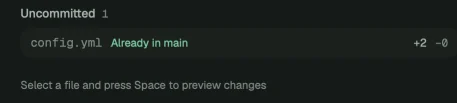
Each uncommitted file is compared piece by piece against main, so “already in main” holds even for work that was never committed.
Collision warnings
Two agents editing the same file in different worktrees? You’ll know before you merge.
⌘K, in plain words
Filter by name, or — signed in to ChatGPT — search by description.
Live, and quiet about it
FSEvents watches for changes and refreshes only the affected worktree, skipping folders like node_modules. PR status comes from your signed-in gh, one request per repository.
The free version isn’t a trial.
Every feature is free, with no time limit and no account. You pay for one thing only: tracking more than one project.
Tracks 1 project, with any number of worktrees.
- 1 project, unlimited worktrees
- All six kinds of unlanded work + three-layer checks
- Clean up with 7-day restore, Commit & Create PR
- AI summaries and drafts (uses your ChatGPT plan)
- Menu bar, live updates, auto-updates
Unlock every project. Pay once — no subscription, no expiry.
- All projects, tracked together
- Everything in Free
- Activate on 2 Macs at once
- New Mac? Deactivate the old one in Settings
- Supports an independent developer
Questions you might have
Which agents does Orchard recognize?
Claude Code, Codex, Aider, Gemini CLI, Cursor Agent, opencode, Amp and Goose. Orchard looks at which folder each running process is working in, so there’s nothing to install or configure.
How does Orchard know a worktree is already in main?
It checks three layers: whether the branch tip is already in main’s history, whether each commit’s patch (or the whole branch as one squash) matches something in main — cross-checked with the PR on GitHub — and whether uncommitted changes already exist in main. A deterministic algorithm decides; AI is never involved. Each verdict comes with the reason, so you can check it yourself.
Will it get in the way of Claude Code or Codex?
No. Every background command runs with GIT_OPTIONAL_LOCKS=0, so it never refreshes the index or takes index.lock. When an agent process is working in a worktree, Orchard shows it as “Agent working” and won’t clean it up.
How does AI work, and is my code sent anywhere?
AI is optional. It runs through “Sign in with ChatGPT” and uses your own ChatGPT plan — Orchard doesn’t charge for it. Changes are sent to OpenAI only when you’re signed in and use an AI feature. Signed out, no code leaves your Mac. Support for your own API key and other AI providers is planned.
Do I need GitHub? What about GitLab?
The core features need only git. PR status and Commit & Create PR use GitHub’s official gh CLI, signed in once. Only GitHub is supported for now.
Does Orchard change my repositories?
Auto-refresh is read-only. Writes happen only when you click a button (commit, create PR, clean up, save as branch), and you see the commands first. Orchard doesn’t change your git config; the only extra thing it writes is refs/orchard/* for cleanup snapshots.
Can I undo a cleanup?
Before cleanup, uncommitted changes (including new files) and the branch tip are snapshotted to refs/orchard/trash/ and kept for 7 days. Restore with one click under Clean Up › Recently Cleaned. Files ignored by git, like .env, aren’t in the snapshot, so they’re flagged and backed up separately first.
What’s the difference between Free and a License?
Just one: the free version tracks 1 project; a license unlocks all of them. Every feature, AI included, works fully in the free version, with no time limit and no account.
What do I need to run it?
on a Mac with , and git. Orchard is notarized by Apple and keeps itself up to date.

Know what every worktree is doing.
Land what matters. Clear the rest.
Installs in a minute. Your first scan shows every worktree and agent on your Mac.